> For the complete documentation index, see [llms.txt](https://doc.commandersact.com/llms.txt). Markdown versions of documentation pages are available by appending `.md` to page URLs; this page is available as [Markdown](https://doc.commandersact.com/features/consent-management/preference-center.md).
# Marketing Preferences Center (additional module)
## Marketing Preferences Center (additional module)
### What is our Marketing Preferences Center?
Marketing Preferences Center is part of our Consent management Premium offer.
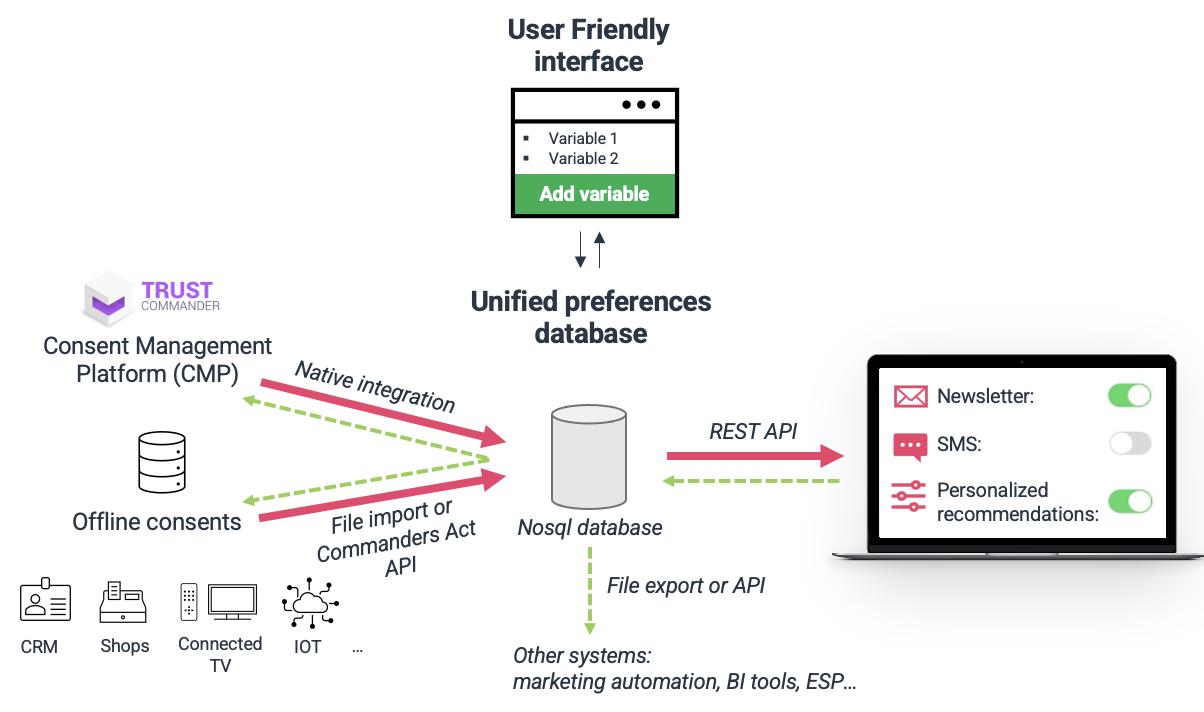
It merges online and offline consents and preferences around unified user profiles, giving you a consolidated, per-user view of what each visitor has agreed to.
This view is read-only : it lets your teams see registered preferences and consents at a glance in the Profile Explorer.
### How it works?
Preferences and consents are stored in a unified database, merged around your visitors' profiles.
· Consents are collected through our CMP solution (native integration)
· Preferences coming from a CRM database can be added via the [FTP importer files](https://claude.ai/features/sources/sources-catalog/import-crm-users/users-file-importer). This is currently the recommended and supported method to load preference data.
· A dedicated API to read and/or write preferences/consents is being redeveloped for improved reliability and is on our roadmap. Once available, it will also support customer-facing use cases such as a customizable preferences page for visitors and regular exports of the full consents database.
#### Limitations:
* The API accepts a maximum of 20 preferences
### Setting up your Preference Center
#### 1. Create the preference variables (CDP)
Preference Center variables are created in **Customers** > **Segment** > **Manage variables**, like any other CDP variable.
For each preference you want to expose, create **two variables**:
| Variable | Purpose |
| ------------------------------------ | ----------------------------------------- |
| `preferences.` | The preference value (opt-in/opt-out) |
| `preferences._date` | The date the preference was last recorded |
**Example**
* Name: `Nouveautés produit & release notes`
* Variable name: `preferences.product_news`
* Category: `Preferences`
* Universe: `Visitor`
* General type: `Boolean` (recommended, not mandatory)
* Structure type: `Simple value`
* Encrypt content: `No`
Add its date counterpart:
* Variable name: `preferences.product_news_date`
* General type: `Date`
Repeat this pair for every preference category you want to track.
#### 2. Import preference data via FTP importer file
Preference values are loaded via CSV file import : there is no real-time update mechanism.
* Map one column per variable, using the exact variable name as the column header.
* Include one column containing the **reconciliation key** : the unique identifier (e.g. visitor ID, email) used to match each row to the right visitor profile.
* You'll need to contact your CSM to set-up the file import.
### Finding the reconciliation key on a profile
Reconciliation keys are configured in **Users > Profile > Identities > Activation**, where each key variable is listed with its priority.
---
# Agent Instructions
This documentation is published with GitBook. GitBook is the documentation platform designed so that both humans and AI agents can read, navigate, and reason over technical content effectively. Learn more at gitbook.com.
## Querying This Documentation
If you need additional information that is not directly available in this page, you can query the documentation by asking a question.
Perform an HTTP GET request on the following URL with the `ask` and `goal` query parameters:
```
GET https://doc.commandersact.com/features/consent-management/preference-center.md?ask=&goal=
```
`ask` is the immediate question: it should be specific, self-contained, and written in natural language.
`goal` is what the user is ultimately trying to achieve, the reason they need the answer. Sharing it helps GitBook give you a better, more relevant answer. A goal is most helpful when it describes the outcome the user wants rather than restating the question. For example, with `ask=how do I create an API token`, a goal like `automate deployments from our CI pipeline` lets GitBook tailor the answer to that use case.
The response will contain a direct answer to the question and relevant excerpts and sources from the documentation.
Use this mechanism when the answer is not explicitly present in the current page, you need clarification or additional context, or you want to retrieve related documentation sections.