> For the complete documentation index, see [llms.txt](https://doc.commandersact.com/llms.txt). Markdown versions of documentation pages are available by appending `.md` to page URLs; this page is available as [Markdown](https://doc.commandersact.com/features/realtime-cookie-scanner/cookie-notice-manager.md).
# Cookie Notice Manager
## Introduction
The **Cookie Notice Manager** lets you review, edit, and publish your cookies list on your website.
## Manage Cookie Information
Cookies are organized into three lists :
1. **To review** – recently detected, **unreviewed**.
2. **Included in Notice** – validated by you, ready to be shown on the notice.
3. **Ignored** – (optional) You can place cookies here that you do not want to see listed in your cookie notice.
{% hint style="success" %}
The cookie manager interface reflects the current status of your site in real time. When you refresh the page, the “To review” section may contain cookies that have just been detected a few seconds ago.
{% endhint %}
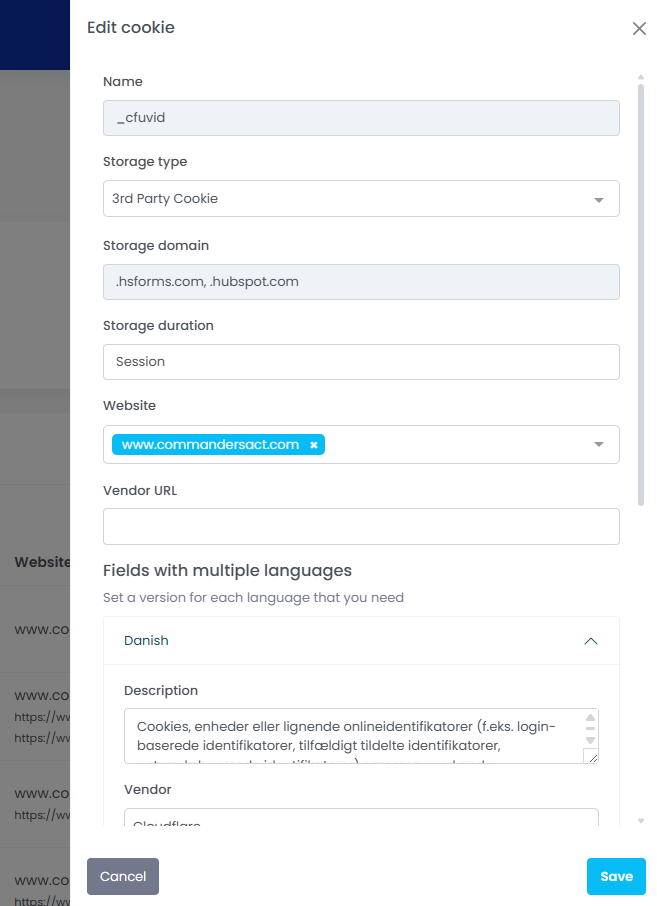
Each entry can be edited (✎) to adjust vendor, category, storage type, domain, duration, and description.\
You can also add custom cookies or activate/deactivate existing ones.
> Keep internal cookies in *Ignored* to prevent reappearance after future scans.
| **Name** |
Name of cookie e.g. \_ga \*In case of multiple (more than 3) cookies with common pattern, they re grouped by patterns
|
Tag client-side
Chrome Extension
|
| -------------------- | ----------------------------------------------------------------------------------------------------------------------------------------------------------------------------------------------------------------------------------------------------------------------------------------------------------------------------------------------------------------------------------------------------------------------------------------------------------------------------------------------------------------------------------------------------------------------------------------------------------------------------------------------------------------------------------------------------------------------------------------------------------------------------------------------------------------------------------------------------------------------------------------------------------------------------------------------------------------------------------------------------- | ---------------------------------------------------------------------------------- |
| **Vendor** | Name of the vendor that uses the cookie e.g. Google |
Cookie Database
|
| **Category** | Category of the cookie that give a high level information on the purpose of the cookie e.g. Technical Cookie |
Cookie Database
|
| **Storage Location** |
Storage location of the cookie (combination of cookie type and storage domain). It has one of the following values:
The domain in brackets is the domain where the cookie is stored. For 1st party cookies it is the domain or subdomain of the website. For 3rd party cookies it is a 3rd party domain or subdomain that is different from the website.
|
Tag client-side
Chrome Extension
|
| **Storage Duration** |
Storage duration of the cookie. An algorithm is used to smoothen technical inaccuracies and to optimise readability for users:
For Session Cookies it displays "Session"
Under 1 month it displays in days, e.g. "7 days"
Above 1 month it displays in month, e.g. "13 months"
Above 36 month it displays in years, e.g. "5 years".
Above 100 years it displays “Unlimited”
Local storage always has duration "Unlimited" and session storage always has duration "Session".
|
Tag client-side
Chrome Extension
Cookie Database
|
| **Description** | Description for what the cookie is used, e.g. “Base64 UUID used to identify users on this website to optimise usage across sessions. Used on all pages.” |
Cookie Database
|
| **Website** |
Domain(s) of the website(s) the cookie is scanned. For 1st party cookies, the full URL of the latest scan is also displayed
|
Tag client-side
Chrome Extension
|
### Settings
Need to declare a new domain, or add a new language?
You can do it directly in the side panel "settings"
Our tool can detect automatically all your subdomains if needed, simply use the "\*" in your domain declaration
example

If you prefer to collect only for some specific sub domains, you have to declare each of them
example:\

### Custom Fields & Filters
* Add custom fields via Settings (⚙️) to store extra info.
* Filter by website, language, storage type, or 3rd-party domain, vendor, category.
* Filter by detection stauts (before consent, after refuse, missing, no status)
* A frequency slider hides rare cookies (< 5 % by default).
{% hint style="info" %}
Cookie scanner doesn't store cookie's values
{% endhint %}
Click on "more filters" to see them all
{% hint style="info" %}
You can also create a custom filter, based on your URL params, via the "settings" panel
\
[check this section](#custom-filter-path-url) for more details
{% endhint %}
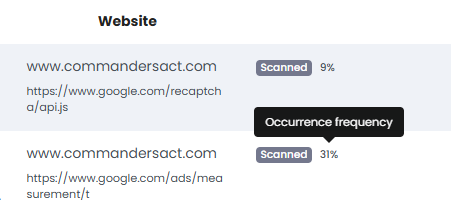
### Occurrence frequency
For all types of cookies & storage you can visualize the percentage of detection frequency
### Time Range filter
You want to see which cookies have been collected on specific period (yesterday, last week, etc...)?
It's now easy to handle, since we add a date picker to let you select the time range you are looking for.
{% hint style="warning" %}
in some rare cases, you will see more cookies last week then yesterday. It might be caused by the "cookies grouped". As an example, you have 3 similar cookies a month ago, but last week our tool has grouped them, they now counted as 1 cookie. We also recommend to activate "rare cookies" to get a clearer view of the latest items collected by our tool.
{% endhint %}
{% hint style="info" %}
Please note:
By default, if no date is selected, we display all cookies, including the missing ones. If you pick a time range/specific date, any “new” cookies with “missing” flag will be hidden
{% endhint %}
### Exempted Flag
To help you to see the exempted cookies set before consent, you can add an "exempted" flag. Simply activate the dedicated switch in "Cookie Edition"
This will helps you to identify quickly the cookies that are allowed to be set without consent user.
Also, by using this flag you can improve your [compliace score](/features/realtime-cookie-scanner/compliance-score.md)
### Custom Filter: Path URL
You can create your own custom filter, based on URL paths
Here's the steps to follow:
\
Enter an example of a complete URL in the settings panel
Our tool will detect all paths. You can select one value to obtain filters based on
Once it's saved, you will see your new filter ready to be used:
### Translations by IA
Our IA feature can translate cookie descriptions in any language.\
Translate all your cookie descriptions in one click.\
\
You get up to 200 free translations per day.\
Need more? Come back tomorrow and you'll receive another 200 free credits!\
\
To translate all your cookies, use the 'Settings' option (one target language allowed at a time).
Do you need to translate just one cookie into many languages?\
Then use the 'Edit Cookie' function:
Our tool will translate your cookies for all languages that have an "empty" description.
### Custom category naming
Real Time Cookie Scanner automatically classifies your cookies into 3 different categories: Essential, Analytics, and Marketing. If you prefer to use personalized names for these categories, you can easily modify the category labels.
Open Settings panel (⚙️) and fill the table "Category Mapping". Once saved, your custom mapping will impact the labels displayed across all Real Time Cookie Scanner interfaces.
{% hint style="success" %}
If you use a Commanders Act Consent banner, our tool will automatically display your privacy categories in the drop-down list.\
In all cases, you are still allowed to enter a custom value
{% endhint %}
Your custom labels are now displayed across all Real Time Cookie Scanner interfaces.
### Cookies ungrouping
The Realtime Cookie Scanner automatically groups every cookie with a similar pattern to avoid displaying too many similar cookies in your cookie notice. For example, ga\_123456, ga\_678912 and ga\_234567 would be grouped together as "ga\_...". However, for technical or GDPR purposes, you may need to ungroup some of them. This is possible! Simply click on the dedicated button to ungroup them.
If your cookie group is still in the "To Review" section all cookies will be automatically ungrouped
If your cookie is currently "Included in Notice", you will be allowed to select specific items
### Custom cookie grouping
The Realtime Cookie Scanner already groups cookies with similar names automatically (see [Cookies ungroupping](#cookies-ungroupping)). Custom grouping rules let you decide the grouping yourself: you define a name pattern, and every cookie matching it is displayed as **a single entry in your cookie notice**, with the matching cookie names listed inside that entry.
Rules are managed in **Settings (⚙️) > Cookie grouping**.
**Automatic groups vs. custom groups**
Both types of groups can coexist in the same cookie notice. You can tell them apart in the *Name* column:
| | Automatic grouping | Custom grouping rule |
| ---------------- | ----------------------------------------------------- | ------------------------------------- |
| Created by | The scanner, when more than 3 cookies share a pattern | You |
| Displayed as | Pattern followed by `…` (e.g. `ga_…`) | The group name you set, e.g. `__hs*` |
| Can be undone by | Ungrouping the entry | Switching the rule OFF or deleting it |
**How a rule matches cookies**
A rule is a **name pattern**, not a list of cookies:
* When you add several values to the same rule, a cookie is grouped if it matches **any** of them.
* The rule applies to every cookie whose name matches the pattern, including cookies detected after the rule was created.
* **Only for vendor** restricts the rule to cookies attributed to one vendor. Cookies with a matching name but another vendor stay outside the group.
{% hint style="warning" %}
The vendor filter relies on the vendor as attributed in your cookie list. The same provider can appear under slightly different vendor names (for example `HubSpot` for 3rd-party cookies and `Hubspot.com` for 1st-party cookies). If you restrict a rule to one vendor, check the live preview to make sure no expected cookie is left out.
{% endhint %}
**Live preview**
The live preview shows which cookies will be grouped, split by storage location (1st party, 3rd party…). It is based on the cookies from your **last scan**: it shows the effect of the rule on what has already been observed, not an exhaustive list of what the rule will ever match.
**Generated regex**
Each rule is converted into a regular expression, which you can display with **Show generated regex**. Advanced users can edit it directly to express patterns the simple conditions cannot. When you do, rely on the live preview to confirm the result: a valid regex can still match more, or fewer, cookies than intended.
**Switching a rule off**
Switching a rule **OFF** restores the individual cookies in the notice, as before the rule existed. The rule is kept, so you can switch it back on later without recreating it.
{% hint style="info" %}
No rule exists by default, so existing cookie notices are not affected. Like any change to your cookie list, grouping is reflected on your website once you deploy a new version of the cookie notice.
{% endhint %}
**Good practice**
A group is displayed as **one entry**, with one category, one description and one duration. Only group cookies that genuinely share the same purpose. Grouping cookies with different purposes or retention periods would make your notice less accurate, not just shorter.
Grouping also changes counts: a group counts as one cookie in the notice, which can make totals differ between periods (see Time Range filter).
***
## Manage Cookie Notice
`Health > Realtime Cookie Scanner > Cookie Notice Manager > DEPLOY (Tab)`
The **DEPLOY** tab is used to install, create, and publish the cookie notice on your website.\
It shows all existing notice versions and their status.
### Install Cookie Notice
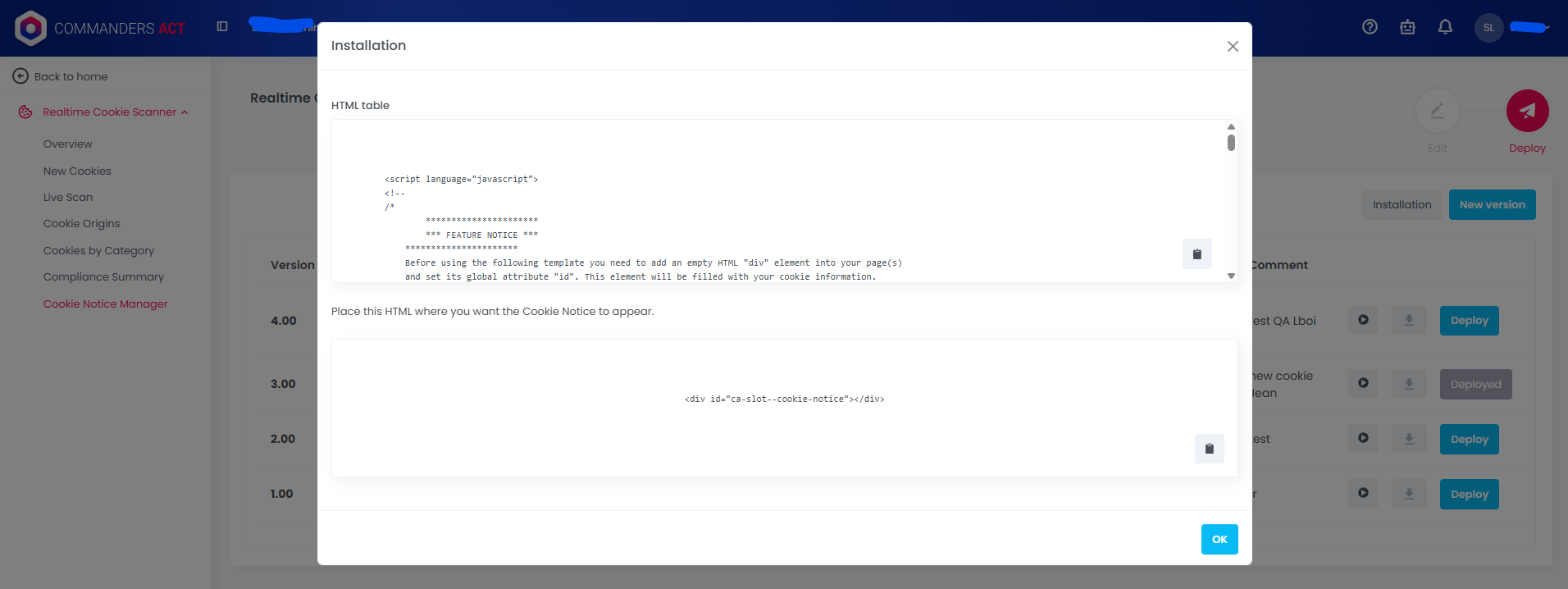
Once the cookie information is set up in the **EDIT** tab, you can install the cookie notice in three formats :
#### **1. JavaScript Snippet**
Paste the JavaScript snippet on your legal page to automatically generate and display the cookie list table.
#### **2. HTML Table (recommended)**
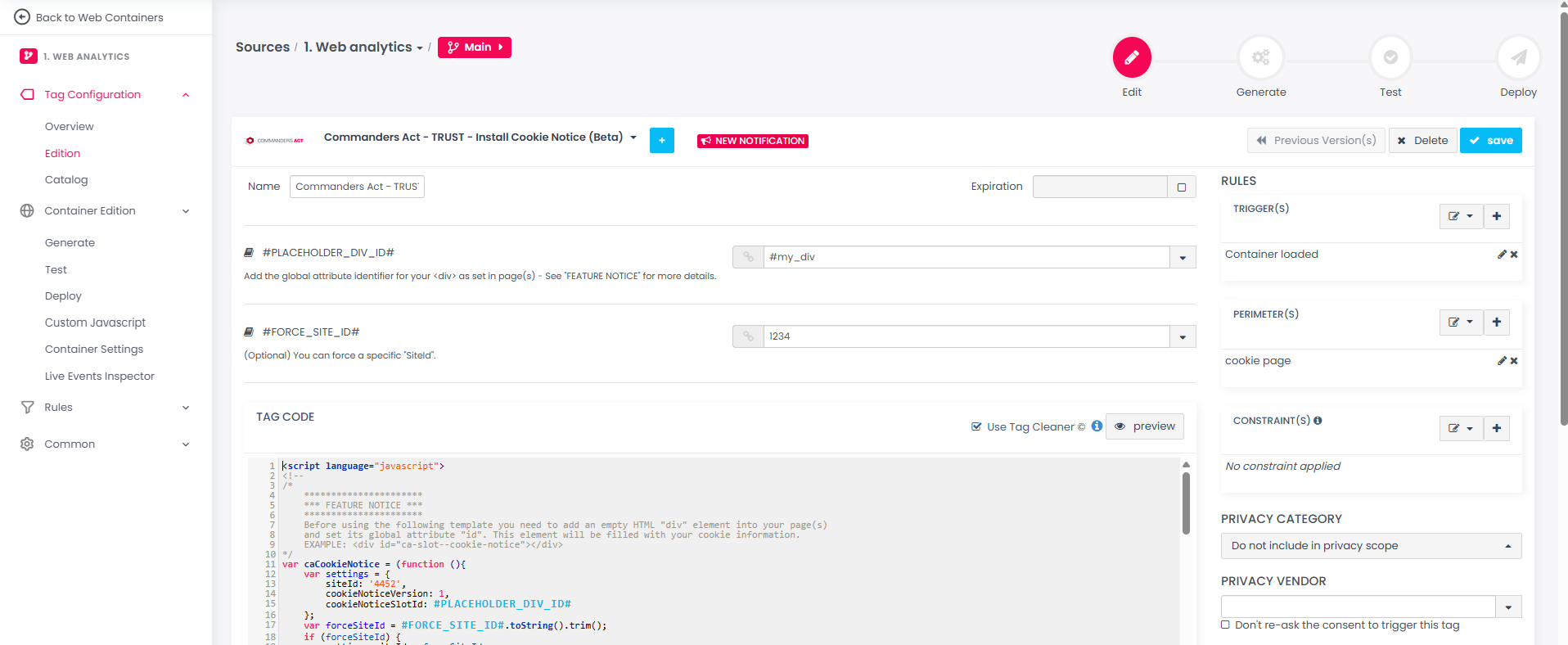
The HTML table is the recommended installation method for a dynamic cookie notice.\
Create a placeholder `
` in your CMS and use the tag template “TRUST | Install Cookie Notice” in your Web Container.\
Both must share the same ID (e.g. `ca-slot--cookie-notice`).
**Endpoint of the HTML file :**
```
https://cdn.tagcommander.com/cookie-scanner//v1/cookies-.html
```
* **site\_id** = your Commanders Act site ID (e.g. 1234)
* **language\_code** = language of the cookie notice (default = `en`)
> ℹ️ The HTML table uses accessible semantic markup and inherits your site’s CSS.\
> You can fully customize its style with your own style sheet.
#### **3. JSON API**
For advanced or custom use cases, the JSON API returns the cookie information in a structured format that can be used in web apps or native apps.
**Endpoint of the JSON file :**
```
https://cdn.tagcommander.com/cookie-scanner//v1/cookies-.json
```
* **site\_id** = your Commanders Act site ID
* **language\_code** = language code (e.g. `fr`, `en`)
{% hint style="info" %}
By default all cookies are listed but it is also possible to manage one cookie notice per website
{% endhint %}
***
### Create a New Version
Click **NEW VERSION** to generate a new cookie notice based on the current cookies Included in Cookie Notice.\
You can add an internal comment to describe the changes.
#### Preview a Version
Use the **Play button (▶️)** to preview any version.\
Preview does not apply your site styling.
#### Export a Version
Click the **Download icon (⬇️)** to export all localisations in `HTML`, `JSON`, `CSV`, or `XLSX`.\
Each language is included as a separate file (or tab in XLSX).
### Customize the Cookie Notice Style
The **Cookie notice style** editor lets you add your own CSS to the cookie notice table, without editing your website's style sheet. These styles combine with your site's CSS; when both target the same element, CSS specificity decides.
* **Add a selector** inserts ready-made selectors for the table, rows, cells and each column.
* One style sheet applies to all languages by default; select a language only to override it.
* Syntax errors are underlined in red and block saving. Always check the preview: valid CSS can still hide text.
{% hint style="info" %}
The stylesheet is empty by default, so existing cookie notices are not affected. Your styles apply from the next version you deploy.
{% endhint %}
Click the "Style" button to enter in the menu
Auto-suggest selector / customisable by language
Code helper
Code helper
Code verification
### Deploy a Version
Press **DEPLOY** to publish a cookie notice version on your site.\
You can also roll back to a previous version if needed.
***
## Labels and Meanings
| Label | Meaning |
| ------------------ | ---------------------------------------------------------- |
| **scanned** | Detected on live user sessions. |
| **new** | Newly found cookie pending review. |
| **missing** | Previously seen cookie not been scanned for over one month |
| **before-consent** | Cookie set before user consent. |
| **custom** | Manually created cookie record. |
***
## Alerts and Integrations
* Instant alerts (< 60 s) on new or non-compliant cookies.
* Configurable by language, and severity.
* Integrations : Email, Webhook, Slack, Microsoft Teams.
* Multiple alerts configuration is possible
---
# Agent Instructions
This documentation is published with GitBook. GitBook is the documentation platform designed so that both humans and AI agents can read, navigate, and reason over technical content effectively. Learn more at gitbook.com.
## Querying This Documentation
If you need additional information that is not directly available in this page, you can query the documentation by asking a question.
Perform an HTTP GET request on the following URL with the `ask` and `goal` query parameters:
```
GET https://doc.commandersact.com/features/realtime-cookie-scanner/cookie-notice-manager.md?ask=&goal=
```
`ask` is the immediate question: it should be specific, self-contained, and written in natural language.
`goal` is what the user is ultimately trying to achieve, the reason they need the answer. Sharing it helps GitBook give you a better, more relevant answer. A goal is most helpful when it describes the outcome the user wants rather than restating the question. For example, with `ask=how do I create an API token`, a goal like `automate deployments from our CI pipeline` lets GitBook tailor the answer to that use case.
The response will contain a direct answer to the question and relevant excerpts and sources from the documentation.
Use this mechanism when the answer is not explicitly present in the current page, you need clarification or additional context, or you want to retrieve related documentation sections.